Working with the TAPE TimeSeries object#
By contrast to the Ensemble, which operates on many lightcurves, the TAPE TimeSeries object operates on a single lightcurve.
Note: This notebook is limited as
TimeSerieshas a very initial implementation
From the Ensemble#
A common use case for the Timeseries is pulling in an object of interest from the Ensemble. The Ensemble has a convenient exporter function for this purpose.
[1]:
from tape import Ensemble, TimeSeries

ens = Ensemble()  # initialize an ensemble object

# Read in data from a parquet file
ens.from_parquet(
    "../../tests/tape_tests/data/source/test_source.parquet",
    id_col="ps1_objid",
    time_col="midPointTai",
    flux_col="psFlux",
    err_col="psFluxErr",
    band_col="filterName",
    sorted=True,
)
[1]:
<tape.ensemble.Ensemble at 0x7ffad340dc30>
[2]:
ts = ens.to_timeseries(88472935274829959)  # provided a target object id
ts.data
[2]:
| midPointTai | psFlux | psFluxErr | filterName | ||
|---|---|---|---|---|---|
| band | index | ||||
| r | 0 | 58246.460938 | 18.149910 | 0.026191 | r |
| 1 | 58249.441406 | 18.269829 | 0.028149 | r | |
| 2 | 58256.421875 | 18.243782 | 0.027706 | r | |
| 3 | 58259.445312 | 18.198299 | 0.026956 | r | |
| 4 | 58262.378906 | 18.211143 | 0.027165 | r | |
| ... | ... | ... | ... | ... | ... |
| g | 93 | 59378.359375 | 18.968945 | 0.061589 | g |
| 94 | 59382.382812 | 18.971306 | 0.061686 | g | |
| 95 | 59386.339844 | 18.872196 | 0.057729 | g | |
| 96 | 59392.300781 | 18.671389 | 0.050575 | g | |
| 97 | 59395.386719 | 19.070024 | 0.065927 | g |
499 rows × 4 columns
As a result, we get a multi-indexed Pandas DataFrame with data from a single lightcurve. The multi-index contains a band index as well as a integer index. We can operate on this as we normally would a Pandas DataFrame.
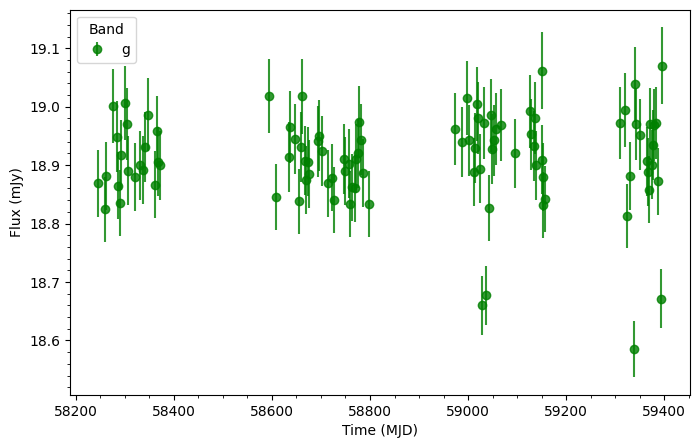
Below we plot out the g-band of the lightcurve.
[3]:
import matplotlib.pyplot as plt


ts_g = ts.data[ts.band == "g"]

plt.figure(figsize=(8, 5))
plt.errorbar(ts_g.midPointTai, ts_g.psFlux, ts_g.psFluxErr, fmt="o", color="green", alpha=0.8, label="g")
plt.xlabel("Time (MJD)")
plt.ylabel("Flux (mJy)")
plt.minorticks_on()
plt.legend(title="Band", loc="upper left")
[3]:
<matplotlib.legend.Legend at 0x7ffa97ee0ee0>