Quickstart#
The latest release of TAPE is installable via pip, using the following command:
[1]:
%pip install lf-tape --quiet
Note: you may need to restart the kernel to use updated packages.
For more detailed installation instructions, see the Installation Guide.
TAPE provides a scalable framework for analyzing astronomical time series data. Let’s walk through a brief example where we calculate the Structure Function for a set of spectroscopically confirmed QSOs. First, we grab the available TAPE Stripe 82 QSO dataset:
[2]:
from tape import Ensemble

ens = Ensemble()  # Initialize a TAPE Ensemble
ens.from_dataset("s82_qso", sorted=True)
[2]:
<tape.ensemble.Ensemble at 0x7fe8c82f1ff0>
This dataset contains 9,258 QSOs, we can view the first 5 entries in the “object” table to get a sense of the available object-level information:
[3]:
ens.head("object", 5)
[3]:
| ra | dec | SDR5ID | M_i | M_i_corr | redshift | mass_BH | Lbol | u | g | r | i | z | Au | |
|---|---|---|---|---|---|---|---|---|---|---|---|---|---|---|
| dbID | ||||||||||||||
| 70 | 2.169302 | 1.238649 | 301 | -23.901 | -24.181 | 1.0730 | 0.000 | 0.000 | 20.793 | 20.469 | 20.197 | 20.040 | 20.000 | 0.116 |
| 98 | 1.091028 | 0.962126 | 144 | -23.399 | -23.576 | 0.7867 | 0.000 | 0.000 | 20.790 | 20.183 | 19.849 | 19.818 | 19.430 | 0.183 |
| 233 | 0.331289 | 0.177230 | 58 | -24.735 | -25.058 | 1.6199 | 0.000 | 0.000 | 20.892 | 20.554 | 20.431 | 20.199 | 20.099 | 0.154 |
| 1018 | 1.364696 | -0.098956 | 190 | -23.121 | -24.045 | 0.6125 | 0.000 | 45.433 | 20.098 | 19.722 | 19.784 | 19.485 | 19.541 | 0.178 |
| 1310 | 0.221552 | -0.292485 | 36 | -26.451 | -26.974 | 2.7563 | 9.361 | 46.760 | 20.707 | 19.663 | 19.610 | 19.705 | 19.529 | 0.174 |
The Ensemble stores data in two dask dataframes, object-level information in the “object” table as shown above, and individual time series measurements in the “source” table. As a result, many operations on the Ensemble closely follow operations on dask (and by extension pandas) dataframes. Let’s filter down our large QSO set to a smaller set with the total number of observations per object within a certain range:
[4]:
ens.calc_nobs()  # calculates number of observations, produces "nobs_total" column
ens = ens.query("nobs_total >= 95 & nobs_total <= 105", "object")
We can now view the entirety of our remaining QSO set:
[5]:
ens.compute("object")
[5]:
| ra | dec | SDR5ID | M_i | M_i_corr | redshift | mass_BH | Lbol | u | g | r | i | z | Au | nobs_total | |
|---|---|---|---|---|---|---|---|---|---|---|---|---|---|---|---|
| dbID | |||||||||||||||
| 102187 | 2.815377 | 1.249789 | 406 | -22.891 | -23.368 | 0.5804 | 8.023 | 45.571 | 20.777 | 20.368 | 19.950 | 19.570 | 19.273 | 0.142 | 95 |
| 138158 | 10.133773 | -0.230790 | 1541 | -22.266 | -22.827 | 0.2419 | 8.332 | 45.131 | 19.090 | 18.857 | 18.485 | 18.085 | 18.033 | 0.117 | 105 |
| 187596 | 10.556096 | 0.988253 | 1615 | -22.652 | -23.392 | 0.3289 | 8.392 | 45.321 | 19.915 | 19.185 | 18.589 | 18.423 | 17.770 | 0.105 | 95 |
| 711662 | 15.176414 | 1.083781 | 2359 | -22.703 | -23.310 | 0.6383 | 0.000 | 0.000 | 20.942 | 20.491 | 20.330 | 19.979 | 19.815 | 0.117 | 100 |
| 762267 | 343.360626 | 0.507056 | 75223 | -22.187 | -23.001 | 0.4627 | 7.856 | 45.186 | 21.107 | 20.647 | 20.193 | 19.855 | 19.529 | 0.465 | 95 |
| 1128581 | 339.200653 | 1.190031 | 74754 | -24.092 | -24.483 | 0.5481 | 0.000 | 45.471 | 20.410 | 19.395 | 18.889 | 18.333 | 18.346 | 0.398 | 95 |
| 1250783 | 28.063360 | 0.648427 | 4283 | -23.270 | -24.417 | 0.8656 | 8.432 | 45.550 | 20.865 | 20.368 | 20.131 | 20.169 | 19.936 | 0.158 | 105 |
| 1254675 | 29.243357 | 0.271094 | 4485 | -22.436 | -23.097 | 0.3593 | 7.834 | 45.277 | 19.277 | 19.202 | 19.007 | 18.873 | 18.387 | 0.161 | 105 |
| 1266724 | 26.613321 | 0.350273 | 4077 | -22.295 | -22.739 | 0.4051 | 8.177 | 45.200 | 19.993 | 19.623 | 19.428 | 19.300 | 18.959 | 0.154 | 105 |
| 1393824 | 333.115570 | 0.861277 | 73967 | -26.207 | -26.783 | 1.7729 | 9.260 | 46.675 | 19.617 | 19.396 | 19.341 | 18.971 | 18.955 | 0.235 | 105 |
| 1664567 | 34.941772 | -0.079720 | 5397 | -22.491 | -23.066 | 0.5550 | 8.111 | 45.226 | 20.446 | 20.109 | 20.209 | 19.878 | 19.660 | 0.185 | 95 |
| 1988699 | 36.283642 | 0.285343 | 5594 | -23.966 | -24.449 | 0.5269 | 8.872 | 45.810 | 18.807 | 18.357 | 18.501 | 18.290 | 18.265 | 0.217 | 105 |
| 3776342 | 53.202126 | -0.365366 | 8031 | -25.769 | -26.098 | 1.7134 | 9.438 | 46.518 | 20.075 | 19.873 | 19.751 | 19.475 | 19.374 | 0.594 | 105 |
| 3777871 | 51.230343 | 0.040977 | 7747 | -22.299 | -22.636 | 0.4801 | 8.185 | 45.105 | 20.592 | 20.272 | 20.220 | 19.896 | 19.482 | 0.622 | 105 |
| 3800671 | 54.261101 | 1.107667 | -1 | -22.000 | -1.000 | 0.4280 | -1.000 | -1.000 | 20.540 | 20.300 | 19.950 | 19.410 | 18.870 | 0.000 | 100 |
| 3867529 | 54.385761 | 0.929904 | 8183 | -22.200 | -23.229 | 0.6244 | 0.000 | 0.000 | 21.516 | 21.335 | 21.118 | 20.557 | 20.189 | 0.436 | 100 |
| 3954424 | 358.399628 | -1.110925 | 77189 | -24.394 | -23.636 | 1.2966 | 8.743 | 46.149 | 20.346 | 20.331 | 20.129 | 20.011 | 19.905 | 0.144 | 105 |
| 4938823 | 55.578239 | 0.702042 | 8370 | -22.515 | -22.261 | 0.5520 | 0.000 | 0.000 | 20.938 | 20.591 | 20.427 | 20.034 | 19.599 | 0.661 | 105 |
| 4970580 | 57.908497 | 0.332248 | 8579 | -22.204 | -22.744 | 0.3815 | 8.646 | 45.254 | 21.351 | 20.761 | 20.143 | 19.658 | 18.865 | 1.169 | 95 |
| 4974467 | 55.593185 | -0.571577 | -1 | -24.400 | -1.000 | 2.3700 | -1.000 | -1.000 | 20.580 | 20.840 | 20.370 | 20.470 | 20.590 | 0.000 | 100 |
Finally, we can calculate the Structure Function for each of these QSOs, using the available TAPE Structure Function Module:
[6]:
from tape.analysis import calc_sf2

result = ens.batch(
    calc_sf2, sf_method="macleod_2012"
)  # The batch function applies the provided function to all individual lightcurves within the Ensemble
result.compute()
Using generated label, result_1, for a batch result.
[6]:
| lc_id | band | dt | sf2 | 1_sigma | ||
|---|---|---|---|---|---|---|
| dbID | ||||||
| 102187 | 0 | 102187 | g | 212.944457 | 7906.087066 | 0.0 |
| 1 | 102187 | g | 1113.928944 | 0.058018 | 0.0 | |
| 2 | 102187 | i | 212.944457 | 0.016962 | 0.0 | |
| 3 | 102187 | i | 1113.928944 | 0.017595 | 0.0 | |
| 4 | 102187 | r | 212.944457 | 0.008150 | 0.0 | |
| ... | ... | ... | ... | ... | ... | ... |
| 4974467 | 5 | 4974467 | r | 1857.713042 | 0.041112 | 0.0 |
| 6 | 4974467 | u | 330.626307 | 1.099520 | 0.0 | |
| 7 | 4974467 | u | 1857.713042 | 3233.746505 | 0.0 | |
| 8 | 4974467 | z | 330.626307 | 1.714607 | 0.0 | |
| 9 | 4974467 | z | 1857.713042 | 2.537171 | 0.0 |
250 rows × 5 columns
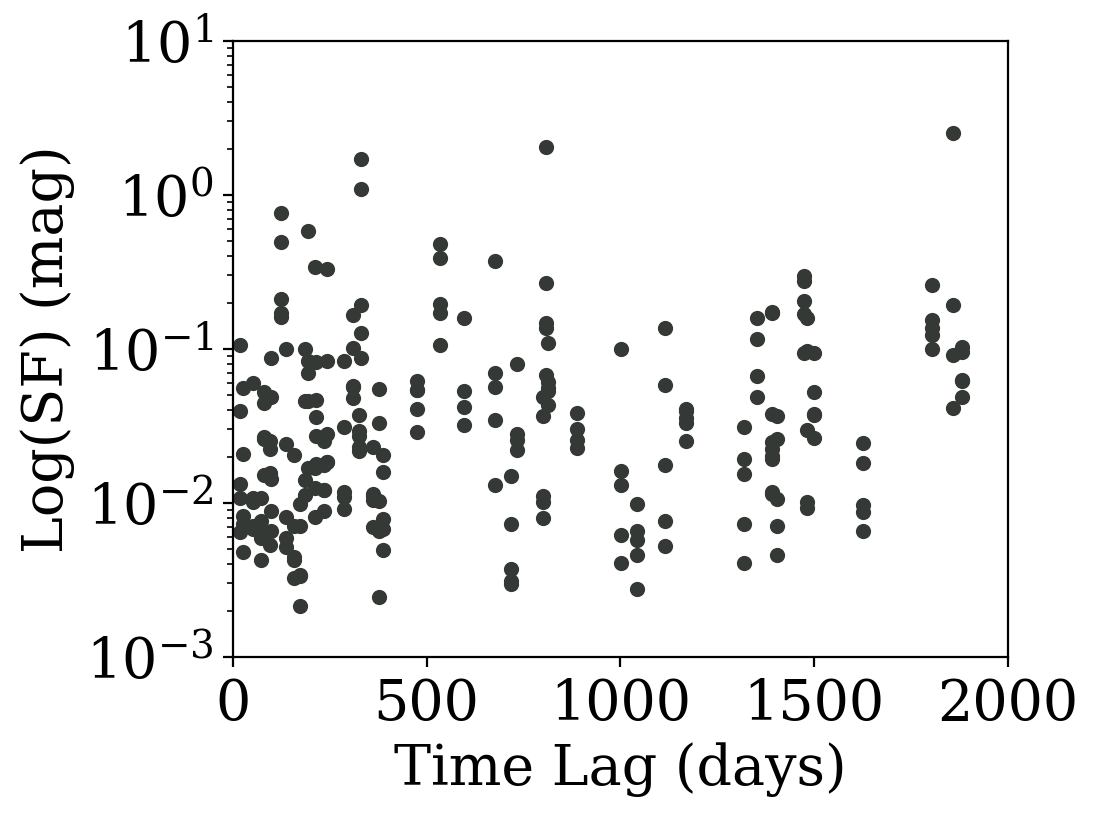
The result is a table of delta times (dts) and structure function (sf2) for each unique lightcurve (labeled by lc_id). We can now visualize our delta times versus the computed structure function for each unique object.
[7]:
import matplotlib.pyplot as plt
from matplotlib import rcParams

%matplotlib inline
%config InlineBackend.figure_format = "retina"
rcParams["savefig.dpi"] = 550
rcParams["font.size"] = 20
plt.rc("font", family="serif")

fig, ax = plt.subplots(nrows=1, ncols=1, figsize=(5, 4))
plt.scatter(result["dt"], result["sf2"], s=20, alpha=1, color="#353935")
plt.yscale("log")
plt.ylabel("Log(SF) (mag)")
plt.xlabel("Time Lag (days)")
plt.ylim(1e-3, 1e1)
plt.xlim(0, 2e3)
[7]:
(0.0, 2000.0)
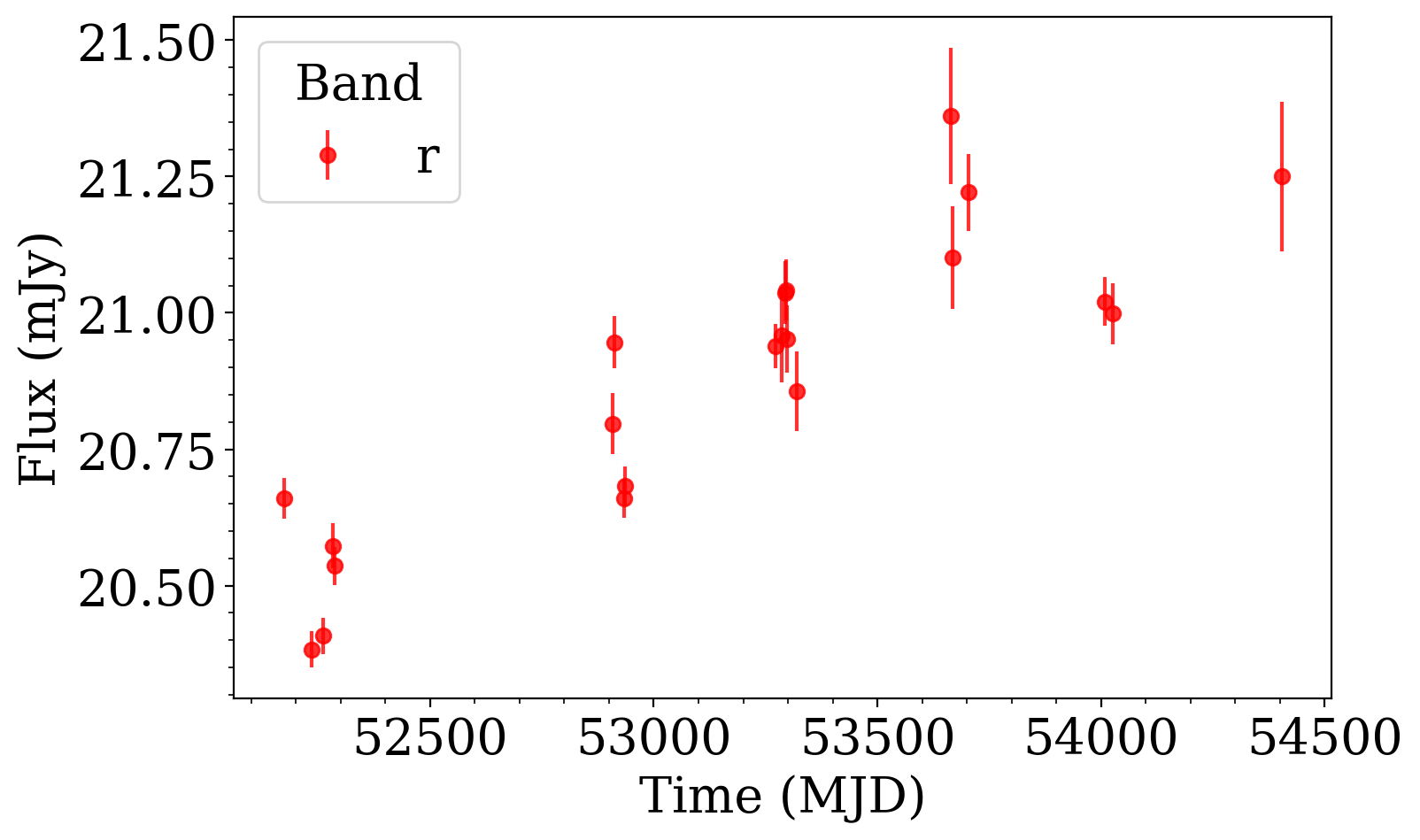
Finally, suppose we want to select the ID with the maximum sf2 value from the computed feature. Using the available ens.to_timeseries() that creates a TimeSeries object, we can access the light curve for the target ID.
[8]:
max_id = result.compute()["sf2"].idxmax()[0]
lc = ens.to_timeseries(max_id)
lc
[8]:
<tape.timeseries.TimeSeries at 0x7fe8b26405b0>
[9]:
filter_r = lc.band == "r"  # select filter

plt.figure(figsize=(8, 5))
plt.errorbar(
    lc.time[filter_r], lc.flux[filter_r], lc.flux_err[filter_r], fmt="o", color="red", alpha=0.8, label="r"
)
plt.minorticks_on()
plt.ylabel("Flux (mJy)")
plt.xlabel("Time (MJD)")
plt.legend(title="Band", loc="upper left")
[9]:
<matplotlib.legend.Legend at 0x7fe876bf5960>