Working with the TAPE Ensemble#
When working with many lightcurves, the TAPE Ensemble object serves as a singular interface for storing, filtering, and analyzing timeseries data.
Let’s create a small example Ensemble from the Stripe 82 RRLyrae dataset.
[1]:
from tape.ensemble import Ensemble

ens = Ensemble().from_dataset("s82_rrlyrae", sorted=True)
The Object and Source Frames#
The Ensemble is an interface for tracking and manipulating a collection of dataframes. When first intialized, an Ensemble tracks two tables (though additonal tables can be added the Ensemble), the “Object dataframe” and the “Source dataframe”.
This borrows from the Rubin Observatories object-source convention, where object denotes a given astronomical object and source is the collection of measurements of that object. Essentially, the Object frame stores one-off information about objects, and the source frame stores the available time-domain data.
The dataframes tracked by the Ensemble are EnsembleFrames (of which the Source and Object tables are special cases).
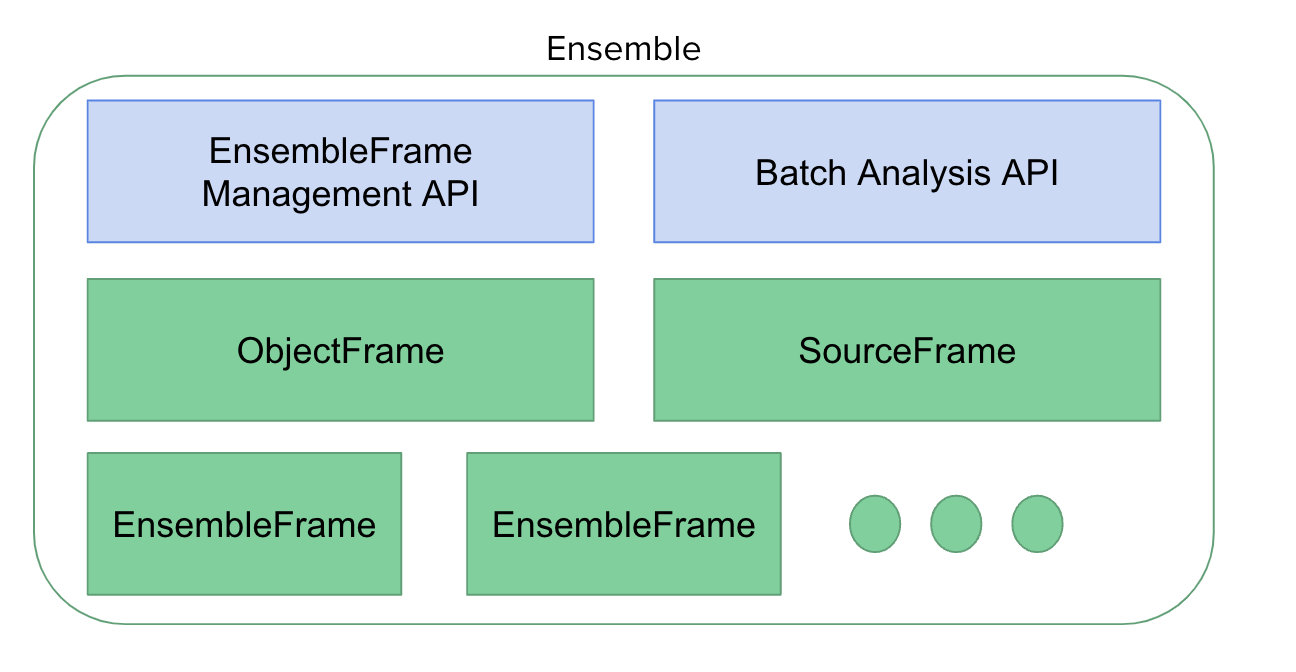
You can access the individual Source and Object dataframes with Ensemble.source and Ensemble.object respectively.
[2]:
ens.source
[2]:
| ra | dec | mjd | flux | error | band | |
|---|---|---|---|---|---|---|
| npartitions=5 | ||||||
| 4099 | float64 | float64 | float64 | float64 | float64 | string |
| 848438 | ... | ... | ... | ... | ... | ... |
| ... | ... | ... | ... | ... | ... | ... |
| 3138275 | ... | ... | ... | ... | ... | ... |
| 5011634 | ... | ... | ... | ... | ... | ... |
[3]:
ens.object
[3]:
| ra | dec | rExt | d | rGC | uF | gF | rF | iF | zF | VF | ugmin | ugminErr | grmin | grminErr | type | P | uA | u0 | uE | uT | gA | g0 | gE | gT | rA | r0 | rE | rT | iA | i0 | iE | iT | zA | z0 | zE | zT | |
|---|---|---|---|---|---|---|---|---|---|---|---|---|---|---|---|---|---|---|---|---|---|---|---|---|---|---|---|---|---|---|---|---|---|---|---|---|---|
| npartitions=5 | |||||||||||||||||||||||||||||||||||||
| 4099 | float64 | float64 | float64 | float64 | float64 | float64 | float64 | float64 | float64 | float64 | float64 | float64 | float64 | float64 | float64 | string | float64 | float64 | float64 | float64 | int64 | float64 | float64 | float64 | int64 | float64 | float64 | float64 | int64 | float64 | float64 | float64 | int64 | float64 | float64 | float64 | int64 |
| 848438 | ... | ... | ... | ... | ... | ... | ... | ... | ... | ... | ... | ... | ... | ... | ... | ... | ... | ... | ... | ... | ... | ... | ... | ... | ... | ... | ... | ... | ... | ... | ... | ... | ... | ... | ... | ... | ... |
| ... | ... | ... | ... | ... | ... | ... | ... | ... | ... | ... | ... | ... | ... | ... | ... | ... | ... | ... | ... | ... | ... | ... | ... | ... | ... | ... | ... | ... | ... | ... | ... | ... | ... | ... | ... | ... | ... |
| 3138275 | ... | ... | ... | ... | ... | ... | ... | ... | ... | ... | ... | ... | ... | ... | ... | ... | ... | ... | ... | ... | ... | ... | ... | ... | ... | ... | ... | ... | ... | ... | ... | ... | ... | ... | ... | ... | ... |
| 5011634 | ... | ... | ... | ... | ... | ... | ... | ... | ... | ... | ... | ... | ... | ... | ... | ... | ... | ... | ... | ... | ... | ... | ... | ... | ... | ... | ... | ... | ... | ... | ... | ... | ... | ... | ... | ... | ... |
Dask and “Lazy Evaluation”#
TAPE is built on top of Dask, a framework for flexible parallelization and data analytics.
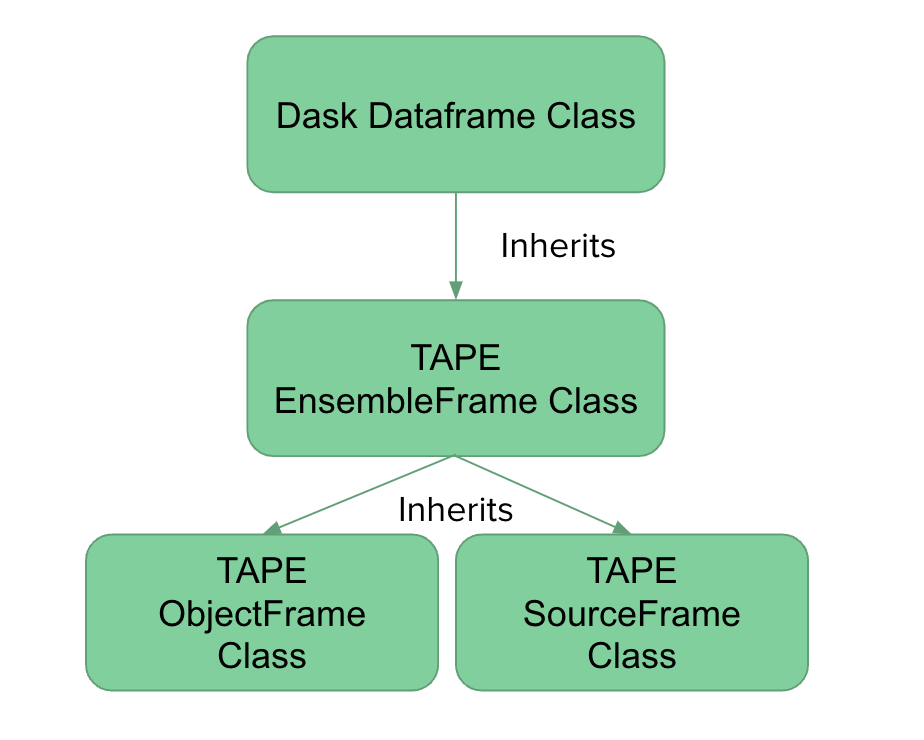
TAPE’s EnsembleFrame objects inherit from Dask dataframes and support most Dask operations.
Note that Source and Object tables are SourceFrames and ObjectFrames respectively, which are special cases of EnsembleFrames.
An important feature of Dask is that it evaluates code “lazily”. This means that many operations are not executed when the line of code is run, but instead are added to a scheduler to be executed when the result is actually needed.
As an example:
[4]:
ens.source # We have not actually loaded any data into memory
[4]:
| ra | dec | mjd | flux | error | band | |
|---|---|---|---|---|---|---|
| npartitions=5 | ||||||
| 4099 | float64 | float64 | float64 | float64 | float64 | string |
| 848438 | ... | ... | ... | ... | ... | ... |
| ... | ... | ... | ... | ... | ... | ... |
| 3138275 | ... | ... | ... | ... | ... | ... |
| 5011634 | ... | ... | ... | ... | ... | ... |
When accessing the Source dataframe above, we only saw an empty dataframe with some high-level information about its schema. To explicitly bring the data into memory, we must run a compute() command on the dataframe.
[5]:
ens.source.compute() # Compute lets Dask know we're ready to bring the data into memory
[5]:
| ra | dec | mjd | flux | error | band | |
|---|---|---|---|---|---|---|
| #id | ||||||
| 4099 | 0.935679 | 1.115859 | 53288.253649 | 18.316 | 0.016 | u |
| 4099 | 0.935679 | 1.115859 | 53294.301322 | 18.477 | 0.020 | u |
| 4099 | 0.935679 | 1.115859 | 53302.249316 | -99.990 | 0.019 | u |
| 4099 | 0.935679 | 1.115859 | 53312.204844 | 18.478 | 0.040 | u |
| 4099 | 0.935679 | 1.115859 | 54009.258962 | -99.990 | 0.017 | u |
| ... | ... | ... | ... | ... | ... | ... |
| 5011634 | 56.510537 | -0.561729 | 53670.408824 | 18.281 | 0.010 | i |
| 5011634 | 56.510537 | -0.561729 | 53673.376811 | 18.327 | 0.009 | i |
| 5011634 | 56.510537 | -0.561729 | 53669.491575 | 18.468 | 0.011 | i |
| 5011634 | 56.510537 | -0.561729 | 53668.405639 | 18.420 | 0.037 | z |
| 5011634 | 56.510537 | -0.561729 | 53669.493242 | 18.371 | 0.034 | z |
142245 rows × 6 columns
With this compute(), we returned a populated dataframe.
Many workflows in TAPE use this Dask paradigm and will look like a series of lazily evaluated commands that are chained together and then executed with a compute() call at the end of the workflow.
Updating an Ensemble’s Frames#
As discussed above, an Ensemble is a manager of EnsembleFrame objects (and Ensemble.source and Ensemble.object are special cases). When performing most operations on one of these tables, the results are not automatically updated to the Ensemble.
Here we filter Ensemble.source by its flux column (see more examples of filtering using these Dask/Pandas style operations in Common Data Operations with TAPE), but note there were no changes to the rows of Ensemble.source.
[6]:
filtered_src = ens.source.query(f"{ens._flux_col} > 15")

print(len(filtered_src))
print(len(ens.source))
129549
142245
Most dataframe operations will return a result frame that is not yet tracked by the Ensemble. When modifying the views of a dataframe tracked by the Ensemble, we can update the Source or Object frames to use the updated result frame by calling
Ensemble.update_frame(filtered_src)
Or alternately:
filtered_src.update_ensemble()
[7]:
# Now apply the filtered result to the Source frame.
filtered_src.update_ensemble()

ens.source.compute()
[7]:
| ra | dec | mjd | flux | error | band | |
|---|---|---|---|---|---|---|
| #id | ||||||
| 4099 | 0.935679 | 1.115859 | 53654.299549 | 16.888 | 0.005 | i |
| 4099 | 0.935679 | 1.115859 | 53656.247145 | 16.901 | 0.006 | i |
| 4099 | 0.935679 | 1.115859 | 53663.260454 | 16.854 | 0.006 | i |
| 4099 | 0.935679 | 1.115859 | 53668.250054 | 16.796 | 0.005 | i |
| 4099 | 0.935679 | 1.115859 | 53670.254906 | 16.832 | 0.005 | i |
| ... | ... | ... | ... | ... | ... | ... |
| 5011634 | 56.510537 | -0.561729 | 52224.370556 | 19.872 | 0.043 | u |
| 5011634 | 56.510537 | -0.561729 | 52234.327053 | 20.245 | 0.065 | u |
| 5011634 | 56.510537 | -0.561729 | 53669.494075 | 18.919 | 0.012 | g |
| 5011634 | 56.510537 | -0.561729 | 53288.409232 | 18.905 | 0.009 | g |
| 5011634 | 56.510537 | -0.561729 | 53294.456904 | 18.815 | 0.009 | g |
129549 rows × 6 columns
The Source frame now has the number of rows we saw when inspecting the filtered result above.
Note that the above is still a series of lazy operations that will not be fully evaluated until an operation such as compute(). So a call to update_ensemble() will not yet alter or move any underlying data.
Storing and Accessing Result Frames#
The Ensemble provides a powerful batching interface, Ensemble.batch(), to perform analysis functions in parallel across your lightcurves.
For the below example, we use the included suite of analysis functions to apply tape.analysis.calc_stetson_J on our dataset. (For more info on Ensemble.batch(), including providing your own custom functions, see the Ensemble Batch Showcase )
[8]:
# using TAPE analysis functions
from tape.analysis import calc_stetson_J

res = ens.batch(calc_stetson_J)
res
Using generated label, result_1, for a batch result.
[8]:
| stetsonJ | |
|---|---|
| npartitions=5 | |
| 4099 | float64 |
| 848438 | ... |
| ... | ... |
| 3138275 | ... |
| 5011634 | ... |
Note for the above batch operation, we also printed output in the form of
"Using generated label, {label}, for a batch result."
In addition to the Source and Object frames, the Ensemble may track other frames as well, accessed by either generated or user-provided labels.
We can access a saved frame with Ensemble.select_frame(label)
[9]:
ens.select_frame("result_1").compute()
[9]:
| stetsonJ | |
|---|---|
| #id | |
| 4099 | {'g': 23.21167977764398, 'i': 10.9253655047691... |
| 13350 | {'g': 44.87199882789314, 'i': 19.2505796382666... |
| 15927 | {'g': 19.604970954488312, 'i': 9.8008457183475... |
| 20406 | {'g': 36.90799509819646, 'i': 16.1738102883035... |
| 21992 | {'g': 29.44066274769296, 'i': 12.5816510013821... |
| ... | ... |
| 4956681 | {'g': 19.765353302948384, 'i': 10.277853424204... |
| 4983075 | {'g': 10.68608793072954, 'i': 5.40255518771361... |
| 4984662 | {'g': 10.024294204545047, 'i': 5.5516638535668... |
| 4992418 | {'g': 21.594430679882223, 'i': 10.354380772158... |
| 5011634 | {'g': 15.669973198284302, 'i': 8.1650611704056... |
483 rows × 1 columns
Ensemble.batch has an optional label argument that will store the result with a user-provided label.
[10]:
res = ens.batch(calc_stetson_J, label="stetson_j")

ens.select_frame("stetson_j").compute()
[10]:
| stetsonJ | |
|---|---|
| #id | |
| 4099 | {'g': 23.211679777643983, 'i': 10.925365504769... |
| 13350 | {'g': 44.871998827893044, 'i': 19.250579638266... |
| 15927 | {'g': 19.60497095448813, 'i': 9.80084571834749... |
| 20406 | {'g': 36.907995098196174, 'i': 16.173810288303... |
| 21992 | {'g': 29.44066274769288, 'i': 12.5816510013819... |
| ... | ... |
| 4956681 | {'g': 19.765353302948483, 'i': 10.277853424204... |
| 4983075 | {'g': 10.686087930729736, 'i': 5.4025551877136... |
| 4984662 | {'g': 10.024294204544876, 'i': 5.5516638535669... |
| 4992418 | {'g': 21.594430679881633, 'i': 10.354380772158... |
| 5011634 | {'g': 15.669973198284877, 'i': 8.1650611704054... |
483 rows × 1 columns
Likewise we can rename a frame with with a new label, and drop the original frame.
[11]:
ens.add_frame(ens.select_frame("stetson_j"), "stetson_j_result_1")  # Add result under new label
ens.drop_frame("stetson_j")  # Drop original label

ens.select_frame("stetson_j_result_1").compute()
[11]:
| stetsonJ | |
|---|---|
| #id | |
| 4099 | {'g': 23.211679777643983, 'i': 10.925365504769... |
| 13350 | {'g': 44.87199882789304, 'i': 19.2505796382664... |
| 15927 | {'g': 19.604970954488156, 'i': 9.8008457183474... |
| 20406 | {'g': 36.90799509819625, 'i': 16.1738102883034... |
| 21992 | {'g': 29.440662747692787, 'i': 12.581651001381... |
| ... | ... |
| 4956681 | {'g': 19.765353302948448, 'i': 10.277853424204... |
| 4983075 | {'g': 10.68608793072969, 'i': 5.40255518771363... |
| 4984662 | {'g': 10.024294204544834, 'i': 5.5516638535669... |
| 4992418 | {'g': 21.594430679881988, 'i': 10.354380772158... |
| 5011634 | {'g': 15.66997319828519, 'i': 8.16506117040549... |
483 rows × 1 columns
We can also add our own frames with Ensemble.add_frame(frame, label). For instance, we can copy this result and add it to a new frame for the Ensemble to track as well.
[12]:
ens.add_frame(res.copy(), "new_res")
ens.select_frame("new_res")
[12]:
| stetsonJ | |
|---|---|
| npartitions=5 | |
| 4099 | float64 |
| 848438 | ... |
| ... | ... |
| 3138275 | ... |
| 5011634 | ... |
Finally we can also drop frames we are no longer interested in having the Ensemble track.
[13]:
ens.drop_frame("new_res")

try:
    ens.select_frame("new_res")  # This should result in a KeyError since the frame has been dropped.
except Exception as e:
    print("As expected, the frame 'new_res' was dropped.\n", str(e))
As expected, the frame 'new_res' was dropped.
 "Unable to select frame: no frame with label'new_res' is in the Ensemble."
Keeping the Object and Source Tables in Sync#
The TAPE Ensemble attempts to lazily “sync” the Object and Source tables such that:
If a series of operations removes all lightcurves for a particular object from the Source table, we will lazily remove that object from the Object table.
If a series of operations removes an object from the Object table, we will lazily remove all light curves for that object from the Source table.
As an example, let’s filter the Object table only for objects of type ‘ab’. This operation marks the result table as dirty indicating to the Ensemble that if used as part of a result computation, it should check if the Object and Source tables are synced.
Note that because we have not called update_ensemble() the Ensemble is still using the original Object table which is not marked dirty.
[14]:
type_ab_only = ens.object.query("type == 'ab'")

print("Object table is dirty: ", str(ens.object.is_dirty()))
print("ddf_only is dirty: ", str(type_ab_only.is_dirty()))
type_ab_only.compute()
Object table is dirty:  False
ddf_only is dirty:  True
[14]:
| ra | dec | rExt | d | rGC | uF | gF | rF | iF | zF | ... | rE | rT | iA | i0 | iE | iT | zA | z0 | zE | zT | |
|---|---|---|---|---|---|---|---|---|---|---|---|---|---|---|---|---|---|---|---|---|---|
| #id | |||||||||||||||||||||
| 4099 | 0.935679 | 1.115859 | 0.089 | 17.75 | 20.03 | 18.134 | 16.989 | 16.777 | 16.703 | 16.685 | ... | 51075.295112 | 103 | 0.317851 | 16.548633 | 51075.295084 | 102 | 0.302557 | 16.539893 | 51075.288235 | 100 |
| 13350 | 0.283437 | 1.178522 | 0.080 | 24.77 | 26.55 | 18.839 | 17.679 | 17.544 | 17.497 | 17.501 | ... | 54025.326474 | 112 | 0.642111 | 17.147570 | 54025.326185 | 116 | 0.583437 | 17.190782 | 54025.327901 | 114 |
| 15927 | 3.254658 | -0.584066 | 0.090 | 29.12 | 30.96 | 19.288 | 18.058 | 17.859 | 17.792 | 17.780 | ... | 53680.226214 | 108 | 0.368674 | 17.610787 | 53680.243421 | 104 | 0.345422 | 17.615747 | 53680.247101 | 100 |
| 20406 | 3.244369 | 0.218891 | 0.088 | 9.13 | 12.76 | 16.715 | 15.543 | 15.336 | 15.286 | 15.276 | ... | 54000.276631 | 108 | 0.342734 | 15.118909 | 54000.293780 | 102 | 0.303788 | 15.132053 | 54000.296412 | 100 |
| 21992 | 4.315354 | 1.054582 | 0.077 | 7.35 | 11.54 | 16.186 | 15.040 | 14.909 | 14.864 | 14.853 | ... | 53698.243534 | 114 | 0.661144 | 14.523218 | 53698.249941 | 111 | 0.619123 | 14.524697 | 53698.245861 | 114 |
| ... | ... | ... | ... | ... | ... | ... | ... | ... | ... | ... | ... | ... | ... | ... | ... | ... | ... | ... | ... | ... | ... |
| 4956438 | 58.036886 | 0.999678 | 0.720 | 8.18 | 15.26 | 16.406 | 15.312 | 15.093 | 15.042 | 15.042 | ... | 54061.387491 | 101 | 0.365324 | 14.855717 | 54061.378811 | 105 | 0.328275 | 14.884268 | 54061.372266 | 100 |
| 4956681 | 58.700931 | 1.228830 | 1.051 | 36.88 | 43.44 | 19.476 | 18.513 | 18.454 | 18.480 | 18.505 | ... | 53272.495204 | 105 | 0.730201 | 18.060217 | 53272.485932 | 113 | 0.583450 | 18.176327 | 53272.488449 | 117 |
| 4983075 | 57.156605 | 0.134676 | 0.527 | 29.15 | 35.64 | 19.114 | 18.054 | 17.869 | 17.818 | 17.842 | ... | 54064.415166 | 101 | 0.278196 | 17.676564 | 54064.408405 | 101 | 0.247065 | 17.722055 | 54064.404969 | 100 |
| 4984662 | 57.128875 | -0.389138 | 0.584 | 39.05 | 45.43 | 19.745 | 18.701 | 18.489 | 18.454 | 18.452 | ... | 53994.472022 | 104 | 0.359037 | 18.272159 | 53994.465668 | 108 | 0.309688 | 18.303267 | 53994.475330 | 100 |
| 4992418 | 57.151443 | 0.892965 | 0.479 | 31.46 | 37.97 | 19.279 | 18.214 | 18.042 | 18.000 | 17.997 | ... | 53681.416038 | 109 | 0.560006 | 17.708949 | 53681.425071 | 107 | 0.512215 | 17.718540 | 53681.406509 | 115 |
379 rows × 37 columns
Now let’s update the Ensemble’s Object table. We can see that the Object table is now considered “dirty” so a sync between the Source and Object tables will be triggered by computing an Ensemble.batch() operation.
As part of the sync the Source table has been modified to drop all sources for objects not with types other than ‘ab’. This is reflected both in the Ensemble.batch() result output and in the reduced number of rows in the Source table.
[15]:
type_ab_only.update_ensemble()
print("Updated object table is now dirty: " + str(ens.object.is_dirty()))

print("Length of the Source table before the batch operation: " + str(len(ens.source)))
res = ens.batch(calc_stetson_J).compute()
print("Post-computation object table is now dirty: " + str(ens.object.is_dirty()))
print("Length of the Source table after the batch operation: " + str(len(ens.source)))
res
Updated object table is now dirty: True
Length of the Source table before the batch operation: 129549
Using generated label, result_2, for a batch result.
Post-computation object table is now dirty: False
Length of the Source table after the batch operation: 102540
[15]:
| stetsonJ | |
|---|---|
| #id | |
| 4099 | {'g': 23.211679777643983, 'i': 10.925365504769... |
| 13350 | {'g': 44.87199882789309, 'i': 19.2505796382667... |
| 15927 | {'g': 19.604970954488245, 'i': 9.8008457183475... |
| 20406 | {'g': 36.907995098196366, 'i': 16.173810288303... |
| 21992 | {'g': 29.440662747692894, 'i': 12.581651001381... |
| ... | ... |
| 4956438 | {'g': 27.59963027619918, 'i': 16.9891154292060... |
| 4956681 | {'g': 19.76535330294842, 'i': 10.2778534242042... |
| 4983075 | {'g': 10.686087930729574, 'i': 5.4025551877135... |
| 4984662 | {'g': 10.02429420454496, 'i': 5.5516638535669,... |
| 4992418 | {'g': 21.594430679882166, 'i': 10.354380772158... |
379 rows × 1 columns
To summarize:
An operation that alters a frame marks that frame as “dirty”
Such an operation on
Ensemble.sourceorEnsemble.objectwon’t cause a sync between the Source and Object if the output frame has not been stored back to eitherEnsemble.sourceorEnsemble.objectrespectively. This is usually done by a call toEnsembleFrame.update_ensemble()Syncs are done lazily such that even when the Object and/or Source frames are “dirty”, a sync between tables won’t be triggered until a relevant computation yields an observable output, such as
batch(..., compute=True)orEnsemble.source.merge(result).compute()